Sample logbook printout: the one-page experience summary for airline interviews
This is what Off Chocks prints when you export an experience summary: one page with your totals, your recent flying and your time on each type, in the hours-and-minutes form airline applications use. The app made it from the logbook of a fictional Boeing 737-800 first officer with 3,638 block hours.
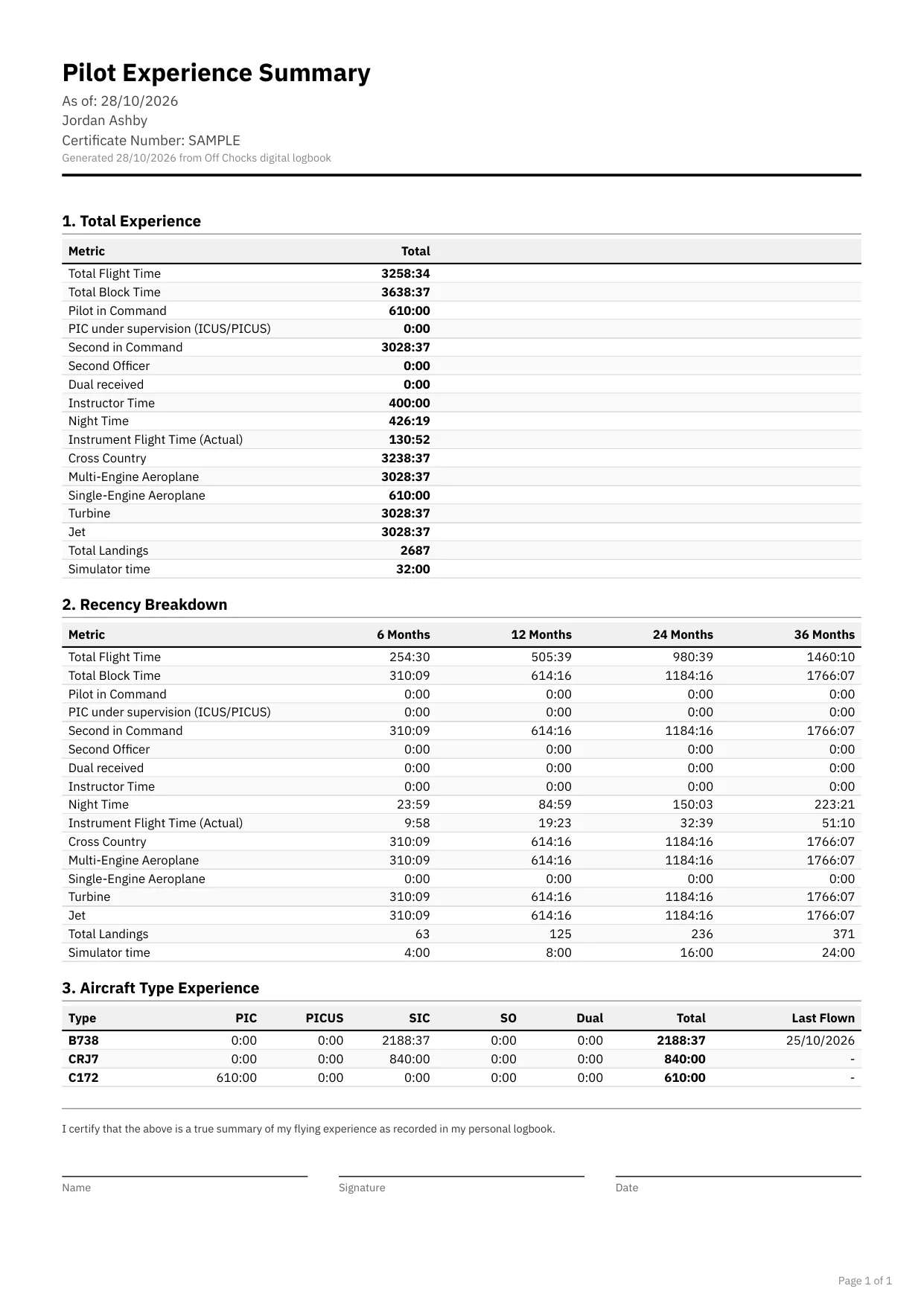
What is on the page
- Total experience
- Every column an application asks for, as all-time totals in hours and minutes: flight and block time, PIC, PIC under supervision, SIC, dual, instructor time, night, actual instrument, cross-country, multi-engine, single-engine, turbine, jet, landings and simulator time.
- Recency breakdown
- The same rows for the last 6, 12, 24 and 36 months, so the panel sees how much you have flown lately without counting pages.
- Aircraft type experience
- Your time on each type, split by PIC, PICUS, SIC, second officer and dual, with the date you last flew it.
- Certification line
- A sentence that the summary is true, with lines for your name, signature and date.
Check it before you print
The columns that must add up do: on this sample, PIC 610:00 plus SIC 3028:37 makes the block total of 3638:37. Run the same test on yours. If a category is out, find the flight before the interview, not during it. The audit guide walks through each check, and the checklist fits on one printed page.
- How to audit your pilot logbook before an airline interview
- Airline interview logbook checklist: one printable page
The FAA 8710-1 summary
For FAA applications the app also prints Section III of Form 8710-1, the record of pilot time, laid out the way the paper form is, so you can copy each box across; an IACRA layout is there too. It covers instruction received, solo, PIC and SIC, cross-country, instrument and night time by category, and the airplane class totals.
Print your own
- Open the Logbook tab and tap Export.
- Choose Experience Summary (PDF), or FAA 8710-1 or IACRA, and set the As of date if your application asks for totals to a given day.
- Export, then print it or share it from your iPad or iPhone. Exports are free on every plan, including after you stop paying.
Coming from another app? Import your logbook first, compare the totals, then print.
Common questions
- What does an airline want to see from my logbook?
- Totals that match your application, broken down by PIC, SIC, multi-engine, turbine, night and instrument time, plus your recent flying and your time on each type. The experience summary puts all of that on one page, and the panel can check it against your logbook.
- Is this a real pilot's logbook?
- No. Jordan Ashby is a made-up Boeing 737-800 first officer, with a made-up airline and registrations. The certificate number reads SAMPLE. The PDFs are what the app printed from that logbook.
- Can I choose the date the totals run to?
- Yes. The experience summary takes an As of date, so the totals can stop on the date of your application. Leave it empty to include the whole logbook.
- Why are the hours written as 3638:37?
- That is hours and minutes, the form airline applications ask for. 3638:37 is 3,638 hours and 37 minutes.
Try it on your own logbook
Import your logbook and print your own summary. Free for your first 50 logged hours, and flights you flew before you joined don't count.
No card needed.